Brilliant Sort™ Diamond Puzzle
- 4.5
- Rating
- 1.00M
- Installs
- Free
- Price

 Analysis by App-foxy
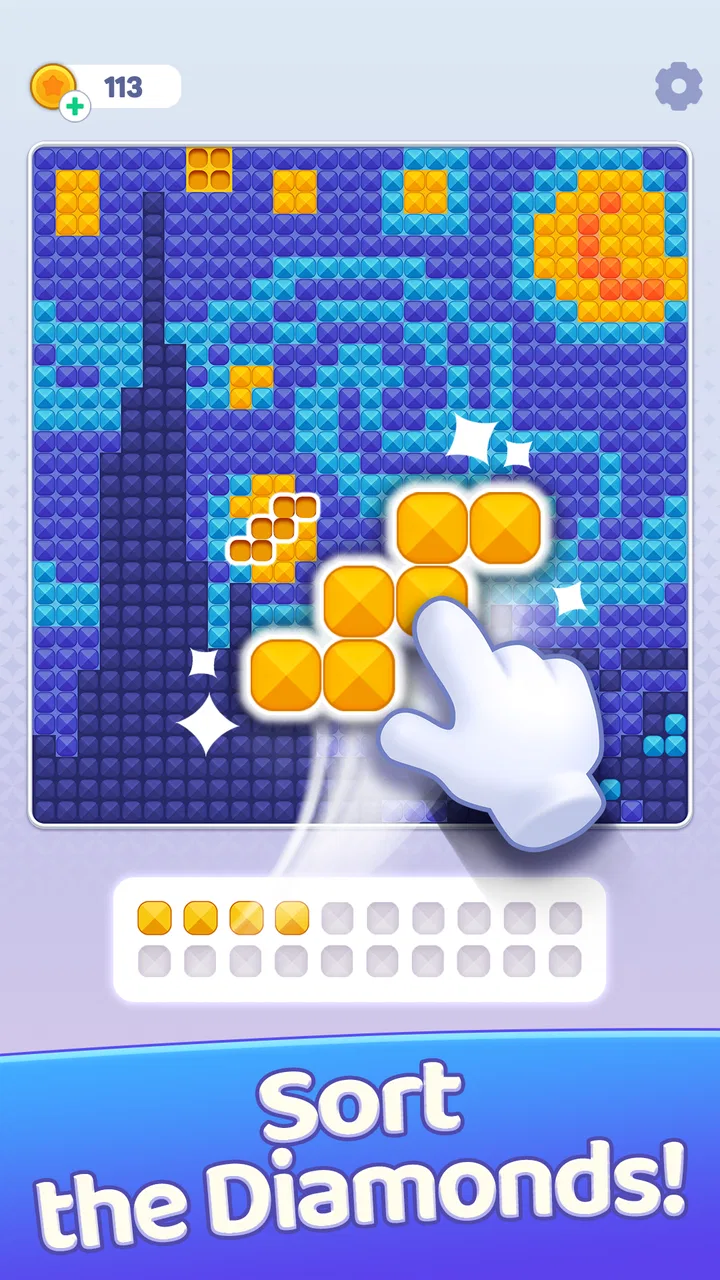
I approached Brilliant Sort™ Diamond Puzzle expecting a quiet color-sorting game, but its appeal is a little more specific: it turns diamond-art pictures into a sequence of small organizational decisions. You sort gems, place them into the matching areas, and gradually watch an image take shape. That familiar loop makes it easy to understand in seconds, yet the best sessions are not completely mindless. Choosing what to sort first, keeping the board readable, and resisting rushed taps all affect how smoothly a picture comes together.
This is a free puzzle game from BELKA GAMES, aimed at players who enjoy visual progress more than complicated rules. It sits in the relaxing side of the puzzle category, although the Teen content rating is worth noticing for families choosing games for younger children. The game has reached over a million installs and holds a 4.5 average from around 24 thousand ratings, which suggests that its central idea has connected with a substantial audience. I can understand why: the basic loop is approachable, colorful, and easy to fit into a short break.
How the basic sorting loop feels in everyday play
The first thing I would explain to a friend is that this is not a traditional logic puzzle with one difficult answer. The challenge comes from managing visual information. You are looking at a picture divided into areas and working with colored diamond pieces that need to go where they belong. Each correct placement makes the artwork feel more complete, so the reward is both the small success of a correct move and the larger reveal at the end.
You May Also Like

 Blood Strike: 2.5 Anniversary
Blood Strike’s Loadouts Turn Every Drop Into a Tactical Gamble
A close look at Blood Strike’s custom loadouts: how fast access to signature weapons reshapes its battle royale rhythm, rewards preparation, and narrows the gap between fights.

 Pandora - Music & Podcasts
Pandora’s Music Is Easy to Start, but Harder to Recover
Pandora’s strength is its low-effort path from a seed to a station. Its weak spot is how much confidence it asks you to place in connection, setup, and quiet recovery.

 8 Ball Pool
 Is Built on Rivalries, Rematches, and Routine
A close look at the rivalries, rematches, shared routines, and unanswered safety questions that turn a quick pool match into a persistent mobile community.

 Samsung Music
’s Quiet Strength Is Playing What You Already Own
Its reach comes less from spectacle than from dependable access to a personal library. That simplicity is both the app’s strongest retention engine and its ceiling.

 AccuWeather: Weather Radar
AccuWeather Review: A Quick, Clear Forecast for Everyday Decisions
For everyday plans, the best forecast is the one you can understand quickly. AccuWeather makes rain timing, radar, and local conditions easy to act on, with a few trade-offs.

 Hill Climb Racing
Why Hill Climb Racing Still Turns Crashes Into One More Run
A tiny car, a bumpy hill and one more upgrade: Hill Climb Racing keeps resurfacing because its simple chaos makes every near-miss feel personal.
More From Our News Desk



That makes the game particularly suitable for a waiting room, a short commute, or the few minutes before bed. I found it easier to enjoy in short sessions than as a game demanding a long commitment. You can begin with one visible color, make progress, and stop without needing to remember a complicated story or a chain of tactical decisions. If you like games that let you relax while still giving your hands something precise to do, this format makes sense.
My most reliable baseline workflow was simple. I first looked over the whole image instead of immediately tapping the most obvious gem. Then I chose a color with several clearly visible destinations and worked through that group before moving to a less common shade. This reduced the visual clutter and made the next color easier to identify. It sounds minor, but sorting randomly can make the board feel busier than it really is.
I also learned not to treat every bright area as an invitation to tap. Diamond-art visuals can contain neighboring colors that look close at a glance, especially when the image is detailed. Slowing down for a moment before placing a piece saved me from breaking the rhythm with repeated corrections. The game is relaxing when I stay deliberate; it becomes more irritating when I turn it into a speed test.
A realistic use case is a ten-minute evening reset. I can play one section after finishing work, focus on grouping the visible colors, and stop once the image has noticeably advanced. That feels different from scrolling through an endless feed because there is a clear visual result. On the other hand, someone who wants a deep puzzle with deduction, wordplay, or increasingly complex rules may find the interaction too repetitive.
The strongest part of the baseline workflow is the visible transformation. The picture does not remain an abstract grid for long; each organized group gives the scene more definition. That visual feedback is why the game works better for me than a plain color-matching exercise. The weaker side is that the underlying action remains similar from one moment to the next, so enjoyment depends heavily on whether you like repetition with a decorative payoff.
Small habits that keep the board readable
I recommend beginning at the edges of a busy image when the center contains many similar colors. Border areas often provide clearer shapes, and completing them creates reference points for the rest of the picture. When the artwork has a large, simple region, I do the opposite and clear that open area first. The useful rule is not “always start in one place”; it is to choose the area that will reduce confusion fastest.
Another helpful habit is to pause after finishing a color group. Instead of immediately tapping the next available piece, I use that moment to scan the board again. The completed color can make neighboring spaces easier to distinguish, and a fresh look often reveals a more efficient next target. This is one of those small routines that experienced players naturally develop without needing a special feature or complicated technique.
I would also avoid playing with a cluttered screen around me if I am working on a detailed picture. Reflections, low brightness, or hurried one-handed tapping make similar shades harder to separate. The game itself is uncomplicated, but the visual task benefits from a little attention. That is an important trade-off: it is relaxing because the rules are light, not because every board is effortless.
Settings and purchase choices worth checking
Before settling into longer sessions, I would check the available in-game settings rather than assuming the default arrangement is ideal. The practical goal is to make the board comfortable to read and the interaction easy to repeat. Settings matter more here than they might in a purely abstract puzzle because the experience depends on distinguishing colors and following small targets across an illustrated image.
I pay attention to sound first. Some players enjoy gentle audio feedback because it confirms each placement, while others prefer silence when using the game as a calm background activity. If the game offers sound controls on your device or within its interface, adjusting them can make the difference between a pleasant evening session and a distracting one. I would also check whether vibration is active, since repeated feedback can be reassuring for some people and annoying for others.
Screen comfort is just as important. I prefer a brightness level that keeps pale gems visible without making the display harsh. On a smaller phone, rotating or holding the device differently may improve the view of a dense section, although the exact comfort will depend on the device. These are not advanced game mechanics, but they shape how accurately I can sort and how long I want to continue.
The game is free to download and play, but it includes optional in-app purchases ranging from $0.99 to $99.99 per item. I would treat that range as a reason to decide on a personal spending boundary before handing the phone to a child or starting a long session. The core attraction is the sorting-and-reveal loop, so I would not assume that spending is necessary to understand whether the game suits me. Players who dislike any purchase prompts should be especially attentive to the interface around optional extras.
That purchase structure also affects who I would recommend it to. For an adult who can ignore optional offers, the free entry point makes trying the game straightforward. For a family device, I would review the device’s purchase protections and make sure the person playing understands what is optional. The Teen rating does not automatically make the game unsuitable, but it does mean I would not choose it blindly for a very young child.
There is another useful settings-related habit: keep the game in a consistent visual environment. If I switch between a bright outdoor screen and a dark room, the same colors can feel different, and that makes sorting less comfortable. A stable brightness level and a clean screen help more than trying to play faster. With a game built around visual matching, basic device care becomes part of the strategy.
Faster patterns without turning relaxation into pressure
Once the basic workflow feels natural, speed comes from reducing unnecessary movement rather than tapping recklessly. I look for clusters of the same color and handle them in a compact route. If several matching spaces are close together, clearing them in one sweep keeps my attention in one area. Jumping across the entire picture for every single piece creates more mental switching and makes mistakes more likely.
I also separate “recognition” from “placement.” First I identify the color group I want to work on; then I place its pieces. Constantly changing my mind after every tap is slower than committing to a sensible group. This approach is especially useful when an image contains several shades that are visually related. It gives me a repeatable rhythm: scan, choose, clear, rescan.
A less obvious improvement is to use completed areas as landmarks. When the picture becomes more developed, I can use recognizable objects or outlines to orient myself instead of treating every space as an isolated target. This reduces the time spent searching. The artwork is not merely decoration; it becomes a map of the remaining work.
When I encounter a color that appears only in scattered tiny areas, I leave it until the larger groups are finished unless those small pieces are blocking my view. Clearing a rare color early can feel satisfying, but it may not improve the board’s readability. Larger groups usually create a stronger visual change and make the remaining targets easier to locate. The exception is a rare shade sitting in a crowded section where removing it opens the picture.
I would not measure success only by finishing quickly. A fast session with several mis-taps is less enjoyable than a steady session that leaves the artwork cleanly completed. The game’s relaxing character works best when speed is a byproduct of organization. If a player is chasing a timer or a personal record, the experience may become more tense than the design seems to invite.
Shortcuts are therefore mostly behavioral rather than hidden buttons. I group by color, use the image’s developing outlines as navigation, and rescan after meaningful changes. Those habits are available from the beginning, but they become more valuable as the artwork grows more detailed. They also make the game feel less passive, because I am making small decisions about order instead of simply following the first visible target.
Where the faster approach stops helping
There is a point where optimization becomes counterproductive. If I keep searching for the theoretically perfect next move, I spend more energy planning than playing. The best approach is usually “clear the most confusing area” rather than “find the mathematically fastest route.” That keeps the focus on reducing visual noise, which is the real source of friction in this type of puzzle.
Players with limited color vision may also need to judge whether the visual distinctions are comfortable for them. A color-based diamond puzzle can be less accessible when neighboring shades are difficult to tell apart. Larger shapes and the developing image may provide useful context, but I would not assume that every board will be equally easy to read. Someone who needs strong text labels, high-contrast symbols, or non-color cues may prefer a different puzzle style.
Device size changes the experience too. On a larger screen, detailed scenes can be easier to inspect, while a compact phone may make the same board feel more concentrated. I found that careful tapping matters more than raw screen size, but people with less precise touch control may find small targets tiring. That is a genuine limitation of the format, not a problem that faster play solves.
Advanced limits, repetition, and the right audience
The game’s strength is also its boundary. It offers a focused activity built around sorting gems and revealing images, not a broad collection of puzzle systems. I would choose it over a traditional match-three game when I want a calmer pace and a more gradual visual payoff. I would choose a logic-grid game, word puzzle, or number puzzle when I want stronger reasoning, more varied problem solving, or a challenge that depends less on visual repetition.
Compared with ordinary coloring apps, this game gives me less freedom because I am following the intended gem locations rather than choosing every color myself. That makes the result more structured and easier to complete, but it also means creative players may feel constrained. Compared with digital diamond-painting alternatives, the attraction here is convenience: I can get the sorting sensation without physical materials, cleanup, or a table full of tiny pieces. The trade-off is that the tactile feeling of real craft work is not present.
I would skip it if I need a story, character development, competitive multiplayer, or a puzzle that keeps introducing new rules. I would also skip it if optional purchase prompts are a deal-breaker, even though the game itself is free to start. People who enjoy repetitive craft-like routines, visual completion, and low-pressure progress are much more likely to appreciate it than players looking for constant novelty.
The release is relatively recent, dated June 5, 2025, and the current version is 1.0.2. It runs on Android 7.0 or later, which gives it a broad device range, though actual comfort will still depend on screen size and touch responsiveness. I would check compatibility before installing on an older phone, particularly if the device has limited storage or struggles with colorful illustrated games.
One question many players have is whether it works for very brief sessions. In my experience, yes: the structure does not require a long uninterrupted commitment, and a small amount of sorting can still produce visible progress. Another is whether it suits people who want to relax while listening to something else. It can, provided the visual details remain easy enough to follow; dense images may require more attention than a truly idle activity.
It is also reasonable to wonder whether the game stays interesting after the first few pictures. That depends on what you value. If the pleasure comes from watching each image emerge and improving your sorting routine, the format has staying power. If you need a constant stream of new mechanics, the repeated loop may wear thin. I would judge it as a dependable comfort game rather than an endlessly surprising puzzle experience.
For a practical routine, I would use it as a transition between demanding tasks. Finish one work block, open a picture, spend a few minutes clearing a visually distinct group, and stop before the activity starts feeling like another obligation. The game is best when it remains a small ritual. Trying to force a large amount of progress every day can expose the repetition more quickly.
My final recommendation is positive but specific. Brilliant Sort™ Diamond Puzzle is a good fit for players who want a free, colorful sorting game with a clear visual payoff and a gentle learning curve. Its best qualities appear when I use organized color groups, rescan the board after completing sections, and let the emerging artwork guide my next move. Its limits are equally clear: the core action is repetitive, visual distinctions may not suit everyone, and optional purchases deserve attention.
For me, the game succeeds as a compact diamond-art puzzle rather than as a deep all-purpose puzzler. I would recommend it to a friend who enjoys calm progress, decorative images, and small repeatable habits. I would point a strategy-focused player toward a more demanding logic game instead. If that distinction matches what you want from a mobile puzzle, the simple loop here is easy to settle into and surprisingly satisfying to finish.
FAQs for Brilliant Sort™ Diamond Puzzle
01What is Brilliant Sort™ Diamond Puzzle and how does it work?
Brilliant Sort™ Diamond Puzzle is a captivating puzzle game available on Android and iOS where players sort and arrange colorful diamond pieces to solve intricate puzzles. The game combines strategic thinking with aesthetically pleasing visuals, offering various levels of difficulty to challenge both beginners and seasoned puzzle enthusiasts. Its intuitive interface ensures a seamless gaming experience.
02Is Brilliant Sort™ Diamond Puzzle free to play, or are there in-app purchases?
The game is free to download and play, providing a substantial amount of content without cost. However, it does offer in-app purchases, which can enhance the gameplay experience by providing additional hints, removing ads, or unlocking exclusive levels. These purchases are optional and not necessary to enjoy the main features of the game.
03What are the main features of Brilliant Sort™ Diamond Puzzle?
Brilliant Sort™ Diamond Puzzle boasts a variety of features including hundreds of unique levels, stunning graphics, and smooth animations. The game also offers daily challenges, a leaderboard to compete with friends, and regular updates with new content. Its user-friendly controls make it accessible to players of all ages.
04Does Brilliant Sort™ Diamond Puzzle require an internet connection?
No, Brilliant Sort™ Diamond Puzzle does not require a constant internet connection and can be played offline. This makes it a perfect companion for travel or situations where internet access is limited. However, certain features like leaderboards or in-app purchases may require you to connect online.
05How does Brilliant Sort™ Diamond Puzzle ensure player data privacy?
The developers of Brilliant Sort™ Diamond Puzzle prioritize user privacy by adhering to strict data protection policies. The app collects minimal personal information and uses encryption to protect data. Players can review the app’s privacy policy within the app or on the official website to understand what information is collected and how it is used.
Pros
- Challenging levels keep players engaged.
- Visually stunning with vibrant graphics.
- Smooth
- intuitive controls enhance gameplay.
- Regular updates introduce new features.
- No intrusive ads disrupt the experience.
Cons
- Limited free levels before paywall.
- Occasional lag on older devices.
- In-game purchases can be pricey.
- Requires constant internet connection.
- Soundtrack can become repetitive.

Brilliant Sort™ Diamond Puzzle
Gallery